In addition to modeling Duration Uncertainty, the SSI Schedule Risk Analysis Tool can model specific schedule Risks and Opportunities that have been identified and documented by the project team. These Risks and Opportunities can be incorporated into both Schedule Risk Assessments and Sensitivity Analyses to evaluate their potential impact on project outcomes.
To be recognized and included in the analysis, the following information must be coded within the schedule:
Risk/Opportunity ID: This is a unique identifier assigned to the Risk or Opportunity. This value is stored in a Text or Outline Code field and is used to associate the schedule item with the corresponding risk documentation maintained by the project team.
Impact Duration*: This represents the duration that will be applied to the activity if the Risk or Opportunity is realized. This value must be stored in a Duration field and reflects the schedule impact associated with the event.
Probability of Occurrence: this represents the likelihood that the Risk or Opportunity will be realized. This value is stored in a Number field as a decimal between 0 and 1 (for example, 0.25 = 25% probability). Probability values are only required when performing a Schedule Risk Assessment. Sensitivity Analyses do not require probability values and can model risks and opportunities without this information.
Any task in the schedule can be designated as a Risk or an Opportunity. Risks may be coded on either tasks or milestones, while Opportunities can only be coded on tasks. To ensure that a Risk or Opportunity can influence the analysis results, it should logically precede the flagged Key Event(s) within the schedule.
*In addition to defining a single Impact Duration, Risks and Opportunities may also be assigned Best-Case and Worst-Case duration values. When these additional values are provided, the Impact Duration is treated as the Most-Likely duration. This allows the tool to model duration uncertainty around the impact of the risk or opportunity itself, rather than assuming the Risk or Opportunity will always result in a single fixed duration.
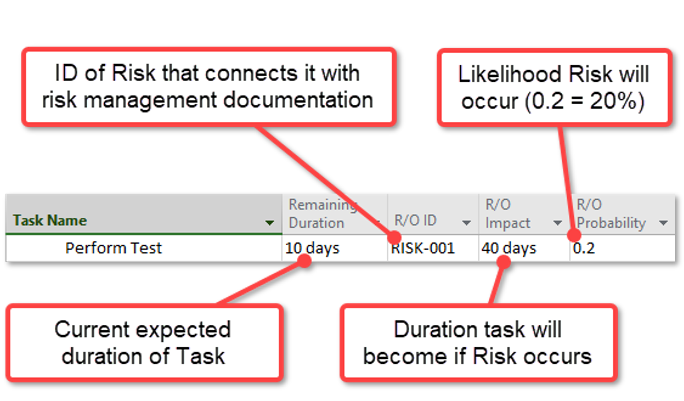
Observe the following example of a Risk modeled in Microsoft Project:
The example above illustrates how a Schedule Risk is can be coded within a Microsoft Project schedule for use by the SSI Schedule Risk Analysis Tool:
The task’s Remaining Duration represents the current Most-Likely duration estimate. In this example, 10 days.
The R/O ID field contains the unique identifier (RISK-001) that links the task to the project's external risk management documentation or risk register.
The R/O Impact field defines the duration the task will assume if the Risk is realized; in this example, the task's duration would increase from 10 days to 40 days.
Finally, the R/O Probability field specifies the likelihood that the Risk will occur during a Schedule Risk Assessment. This value is entered as a decimal between 0 and 1, where 0.2 represents a 20% probability of occurrence.