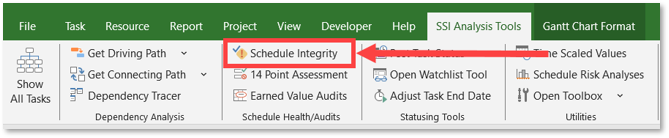
To ensure accurate and meaningful analysis results, your project schedule should be in good health and adhere to established scheduling best practices prior to performing either a Schedule Risk Assessment or Sensitivity Analysis. Because the Schedule Risk Analysis Tool relies on schedule logic and activity relationships to perform its calculations, issues such as missing logic, unnecessary constraints, or dependencies on summaries can reduce the accuracy and reliability of the results. Many of these audits to check the condition of your schedule’s health can be performed using SSI’s Integrity Audits tool:
SSI recommends schedules be checked, and necessary corrective actions be taken for the following conditions:
• Missing Dependencies
• Dangling Finishes
• Dependencies on Summary Tasks
• Out-of-Sequence Dependency Relationships
• Hard Constraints
• Unnecessary Soft Constraints
• Constraints on Summary Tasks
• Manually Scheduled Tasks
• Invalid Status
• Resources Assigned to Summary Tasks
• Resources with Incorrect Calendars
If any Schedule Margin tasks are built into the schedule, their duration should be set to 0 prior to performing either a Schedule Risk Assessment or Sensitivity Analysis.