Recording changes is similar to recording a macro in Microsoft Project or Excel.
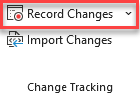
When changes are not being recorded, the SSI Change Recorder button will look like this:
Click the Record Changesbutton to start recording changes (settings will need to be confirmed first).
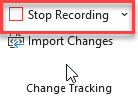
While changes are being recorded, the SSI Change Recorder button will look like this:
Click the Stop Recordingbutton to stop recording changes.
Recording will stop automatically if you switch the active Microsoft Project file while changes are being recorded.
Recorded changes can be reviewed in the Change Recorder Details Pane and, at any time, compiled into a .tcs (Tracked Changes) file or exported to an Excel workbook. If the project is closed before the recorded changes have been compiled, the SSI Change Recorder will automatically compile all uncompiled changes into a .tcs file to ensure that no recorded changes are lost.
Currently, the change recorder can record any of the following changes:
• Deleted tasks
• Added tasks
• Changes to task fields, such as Duration or Text1
• Deleted dependencies
• Added dependencies
• Changes to dependency types
• Changes to dependency lags
• Deleted Assignments
• Added Assignments
• Changes to Assignment fields, such as Remaining Work or Cost.
• Set Baseline Plans
• Set Interim Plans
• Cleared Interim Plans
Currently, The Change Recorder tool cannot record the following changes:
• Changes to the resource sheet (added resources, deleted resources, or changed resources)
• Changes to the time phased work or cost of a resource assignment.