In Microsoft Project, an assignment represents the relationship between a task and a resource. Every time a resource is assigned to a task, Microsoft Project creates an assignment that contains information specific to that task-resource pairing, such as assignment work, assignment cost, and values stored in custom Assignment fields.
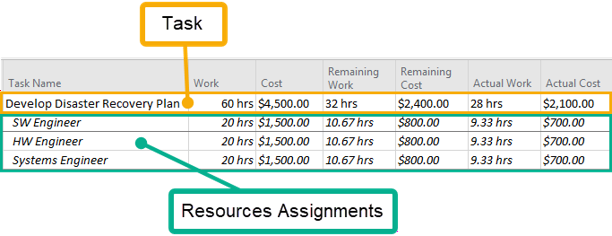
Microsoft Project provides two primary views for working with assignment data: Task Usage, which groups assignments beneath each task:
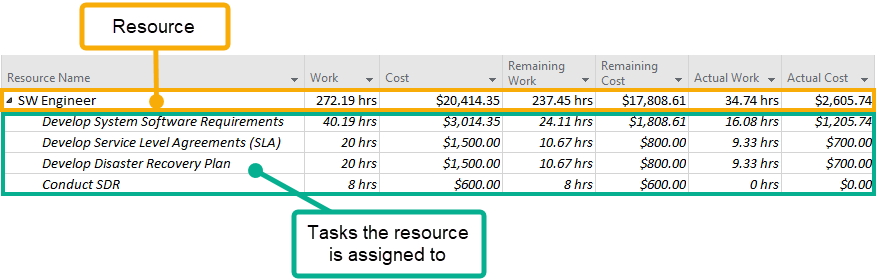
And Resource Usage, which groups assignments beneath each resource:
These views allows you to analyze assignment data from either a task-centric or resource-centric perspective.
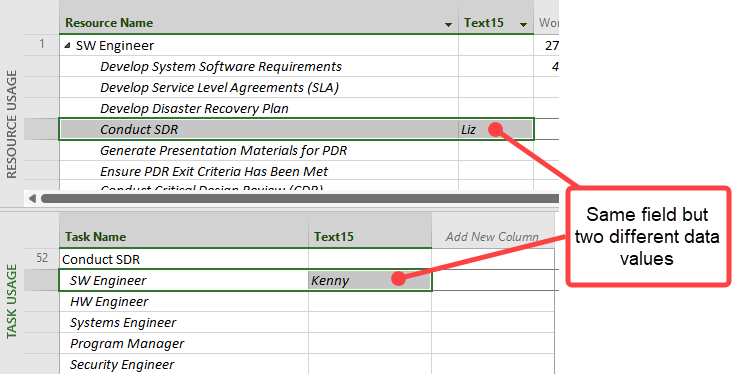
A unique characteristic of Microsoft Project is that values entered into custom Assignment fields are maintained separately for the Task Usage and Resource Usage views. In other words, entering a value into a custom Assignment field in one view does not automatically populate the corresponding field in the other view. Microsoft Project stores these values independently, even though they represent the same task-resource assignment:
This behavior is limited to custom Assignment fields, such as Text1–30, Number1–20, and Flag1–20. Standard assignment fields like Work, Cost, Work Contour, and Cost Rate Table reference the same underlying data regardless of whether they are viewed in the Task Usage or Resource Usage view.
Because of this behavior, the Change Tracking Tools treat changes to custom assignment field data from the Task Usage and Resource Usage views as separate entities when recording and importing changes. This ensures that changes are tracked and synchronized independently for each view, and that values are written to the appropriate set of assignment fields.