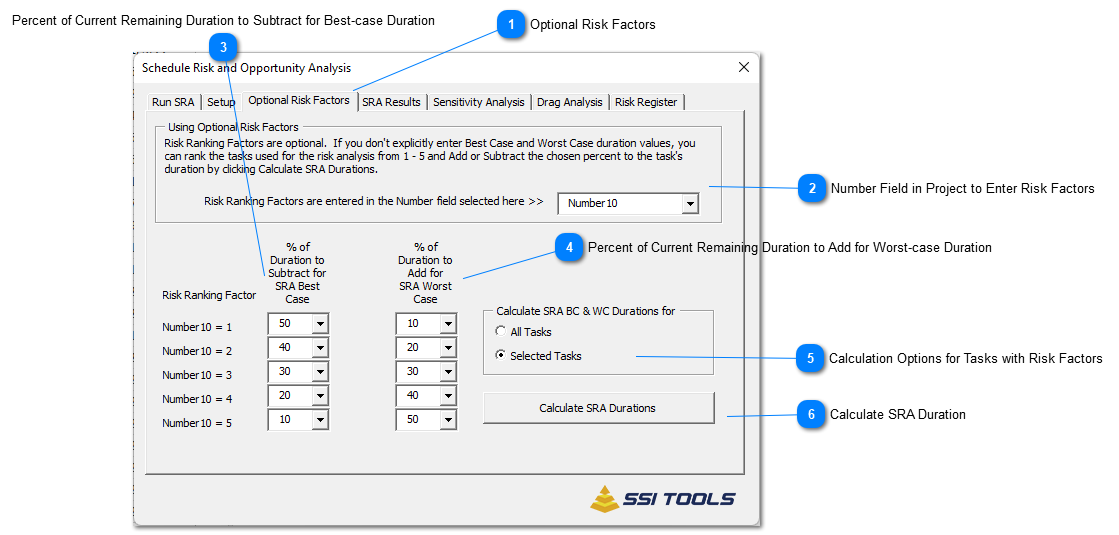
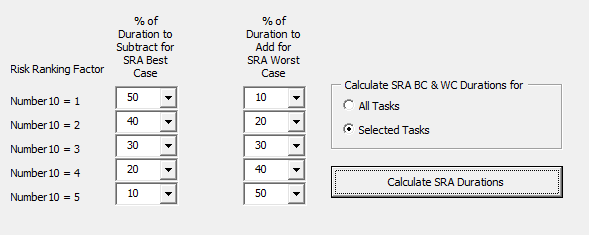
Risk Factors are numbers from 1 - 5 that you enter in a number field of your choice. You set Add/Subtract values that are associated with these numbers using % of Duration to Subtract for SRA Best Case and % of Duration to Add for SRA Worst Case. Tasks in the schedule having Risk Factors (1 - 5) entered in the chosen number field can have their Best-case and Worst-case duration calculated automatically by pressing the button named Calculate SRA Durations. Calculations for Best-case and Worst-case duration are based on the task's current duration.
The table below shows how Best-case and Worst-case duration estimates are calculated on a 10-day task using the Risk Ranking Factors below.
Percent of Current Remaining Duration to Subtract for Best-case Duration
Enter a value (as a percent of the current current remaining duration) to subtract from a task's remaining duration for each risk factor from 1 - 5.
Example - If a task has a 10 day duration, a risk factor of 1, and 25 is the value entered as the % of Duration to Subtract for SRA Best Case, then the best case duration value of 7.5 days will be entered in the field chosen (on Setup Flag and Duration Fields) for Best-case duration.
Percent of Current Remaining Duration to Add for Worst-case Duration
Enter a value (as a percent of the current current remaining duration) to add to a task's remaining duration for each risk factor from 1 - 5.
Example - If a task has a 10 day duration, a risk factor of 1, and 10 is the value entered as the % of Duration to Add for SRA Worst Case, then the worst case duration value of 11 days will be entered in the field chosen (on Setup Flag and Duration Fields) for Worst-case duration.
Calculations can be performed on All Project tasks or the current task selection - but only if risk factors 1 - 5 have been entered in the selected number field.
Tasks having Risk Factors entered in a number field will not have Best-case and Worst-case duration calculated until the user clicks Calculate SRA Durations. Best-case and Worst-case duration on tasks that do not have Risk Factors (1 - 5) will not change. Changing risk factors on tasks or changing values associated with risk factors have no effect on Best-case and Worst-case duration until until the user clicks Calculate SRA Durations.