Flag Key Events
Select one or more milestone in a project and flag as SRA Key Events.
· Pick one of Microsoft Project’s Flag fields 1 through 10
· Set this flag = Yes for each SRA Key Event
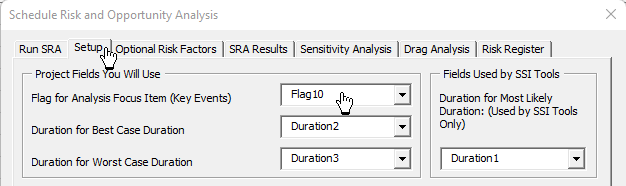
· Click SRA + Sensitivity Analysis from the SSI Analysis Tools menu and select the tab named Setup.
· Set the Flag for Analysis Focus Item (Key Events) to the field you are using for this purpose. Use this field to flag milestones or key events in a project that may be affected by tasks with 3-point duration estimates.
Enter Best-case and Worst-case duration for tasks leading to flagged key events
Tasks that link to your SRA Key Event must have Best-case and Worst-case duration values.
· Pick one duration field (from 1 to 10 to use for Best-case)
· Pick another duration field for Worst-case duration
· Pick one more duration field for SSI Tools to use (you don’t need to enter a duration value in this field – SSI Tools uses it to restore your project’s original duration values)
· Enter Best-case and Worst-case duration values for tasks that link to SRA Key Events. Best-case should be less than or equal to the tasks current Remaining duration. Likewise, a task’s Worst-case duration should be greater than or equal to its Remaining duration and a task’s Worst-case duration should be greater than its Best-case duration.
· Use the Setup tab on the Schedule Risk Assessment form to assign the duration fields for used for SRA and Sensitivity Analysis. 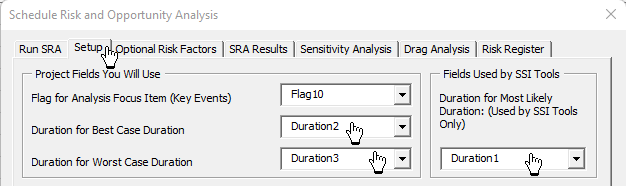
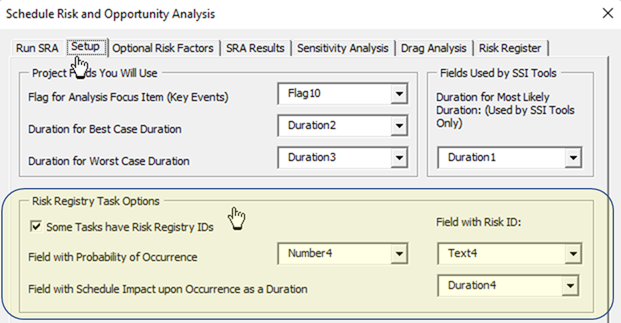
Check the option named “Some Tasks have Risk Registry IDs” to include these tasks, along with their Probability of Occurrence and Schedule Impact upon Occurrence in the SRA results.
· Field with Probability of Occurrence is a task’s number field where you will enter its probability of occurrence between 1% and 100% (entered as .01 through 1.00).
· Field with Schedule Impact upon Occurrence as a Duration is a task’s Duration field where you will enter its duration if the risk or opportunity occurs.
· Field with Risk ID is a task’s text field where you will enter its Risk ID in a project’s Risk Registry.
· Note - only tasks with a value in Field with Risk ID will be used to model Risk and Opportunity duration. Even if you don’t have a formalized Risk Registry, you can still enter a Risk ID in this field. Otherwise, the Monte Carlo modeling technique will be used during an SRA.
See this topic for more on Integrating Risk Registry (Risk and Opportunity) tasks into the SRA modeling.