SSI Tools for Microsoft Project

User guide

×
Menu
Index

One-to-One Sync Options Tab

 
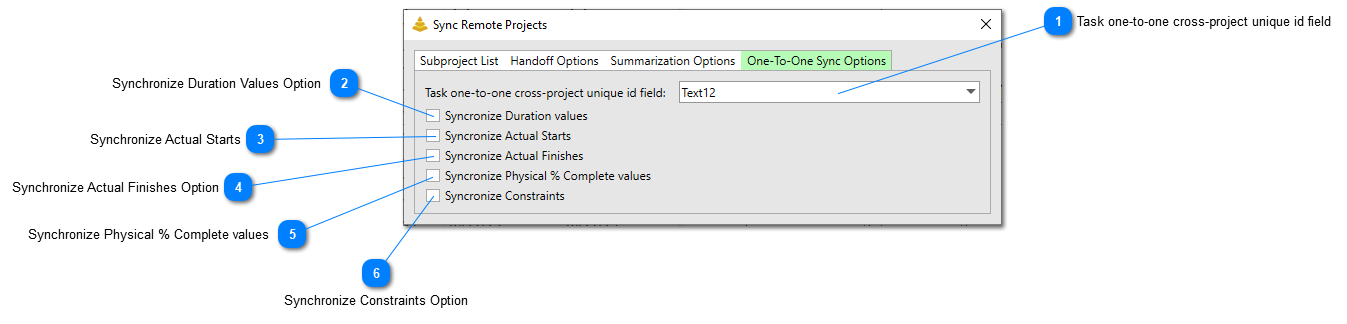
The One-to-One Sync Options tab contains all of the options to perform one-to-one synchronizations. One-to-one synchronization means each unique task will have a one-to-one match within another Subproject or the Master Project that data can be posted to.
 
One-to-One Sync Options Tab
1

Task one-to-one cross-project unique id field

1. Task one-to-one cross-project unique id field
Set this option to the field that contains the unique identifier of tasks. This must be a value that is always the same on a task regardless if the task is in its native Subproject or has been combined with other Subprojects into a master project file. Many teams will refer to this as the Project Unique ID (PUID) field and it will be a text field that contains a formula in the native Subproject file.

2

Synchronize Duration Values Option

2. Synchronize Duration Values Option
Check this option to synchronize the duration values of tasks with their corresponding one-to-one matches.
3

Synchronize Actual Starts

3. Synchronize Actual Starts
Check this option to synchronize the actual start dates of tasks with their corresponding one-to-one matches.
4

Synchronize Actual Finishes Option

4. Synchronize Actual Finishes Option
Check this option to synchronize the actual finish dates of tasks with their corresponding one-to-one matches.
5

Synchronize Physical % Complete values

5. Synchronize Physical % Complete values
Check this option to synchronize the Physical % Complete values of tasks with their corresponding one-to-one matches.
6

Synchronize Constraints Option

6. Synchronize Constraints Option
Check this option to synchronize the constraint types and constraint dates of tasks with their corresponding one-to-one matches.
Made by Dr.Explain, software documentation tool