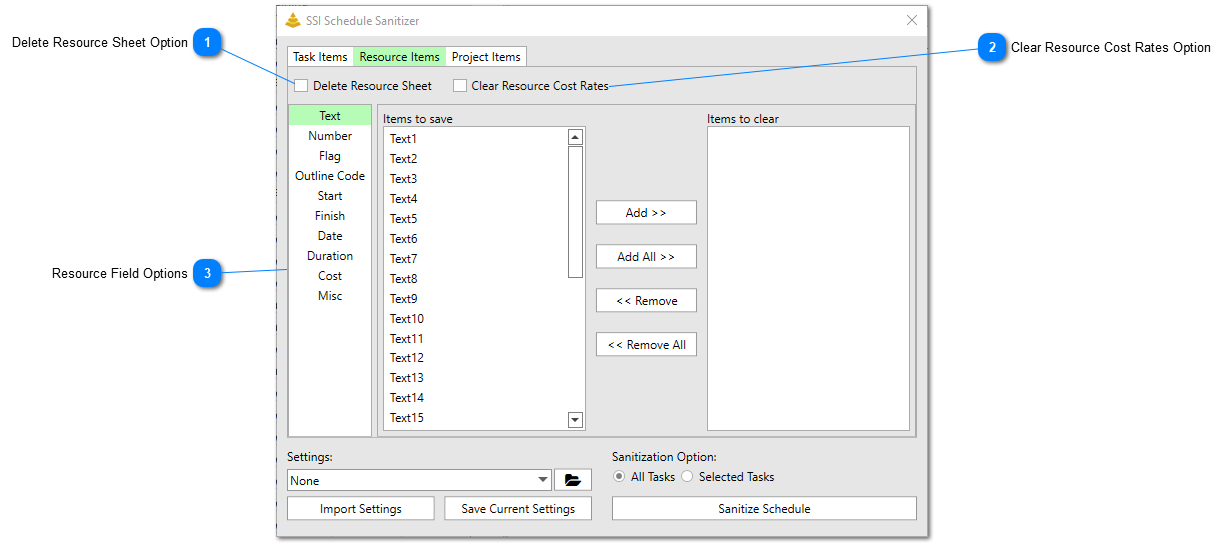
The Resource Items Tab allows user to choose which resource level data to be removed when the schedule sanitization occurs.
Delete Resource Sheet Option
Check this option to delete all resources from the resource sheet and remove any custom names and formulas from any of the resource fields in the resource sheet. Choosing this option also removes all the resource assignments from all tasks. Note - this option will only be followed if the Sanitization Option is set to All Tasks.
Check this option to remove all the cost rates (standard rate, overtime rate, cost/use rate) and associated rate tables from all resources in the resource sheet. Note - this option is only available if the Delete Resource Sheet option is unchecked.
Use these controls to choose which resource fields to remove data from and which resource fields to keep data in. The custom names and formulas of the fields chosen to clear will also be removed. If the Delete Resource Sheetoption is chosen, all of the resource fields will automatically have their custom names and formulas removed.
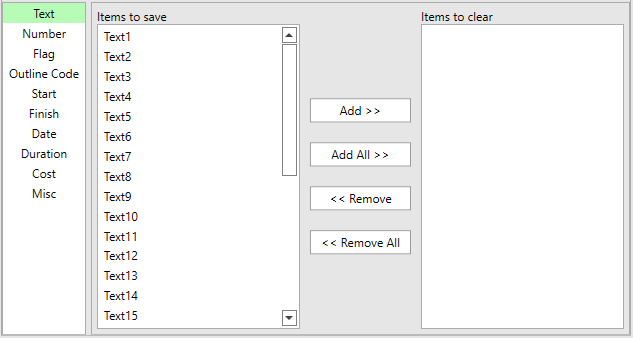
The list box control on the left side is the Resource Fields to Save list. The list on the right side is the Resource Fields to Clear list. Items can be moved back and forth between the two lists by using the Add and Remove buttons. When the schedule sanitization occurs, data in the Resource Fields to Clearlist will be removed, while data in the Resource Fields to Savelistwill be preserved.
Clicking the Add >> button will move any items you have selected in the Resource Fields to Save list to the Resource Fields to Clear list.
Clicking the Add All >> button will move all of the items in the Resource Fields to Save list to the Resource Fields to Clear list, regardless if they are selected or not.
Clicking the << Remove button will move any items you have selected in the Resource Fields to Clear list to the Resource Fields to Save list.
Clicking the << Remove All button will move all of the items in the Resource Fields to Clear list to the Resource Fields to Save list, regardless if they are selected or not.