SSI Tools for Microsoft Project

User guide

×
Menu
Index

SSI Get Timescaled Values Options and Saved Settings

 
SSI Get Timescaled Values Options and Saved Settings
1

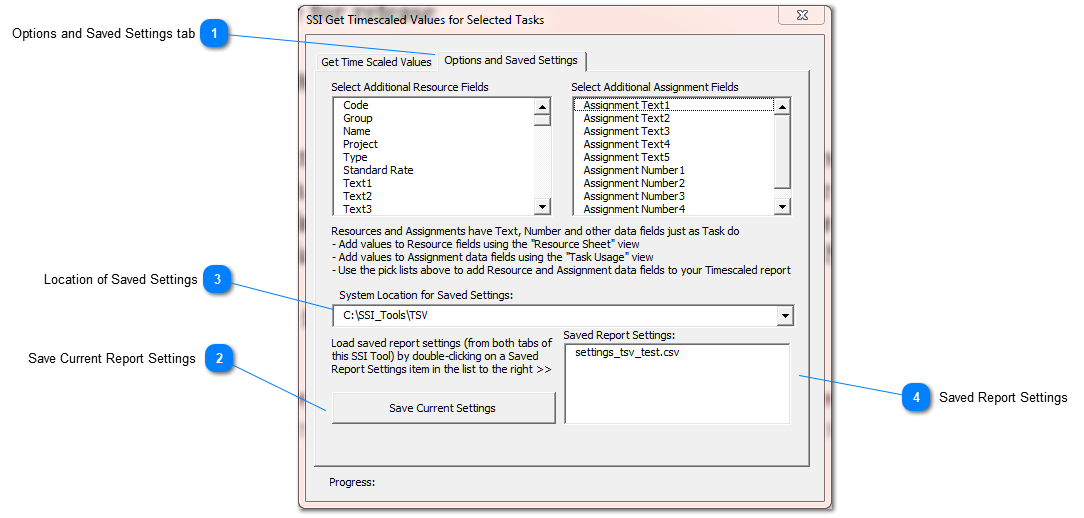
Options and Saved Settings tab

 
Save or load Saved Report settings and select additional reporting data from the Resource and Assignment tables in Microsoft Project. 
2

Save Current Report Settings

 
Click this button to save the setup of a Timescaled values report.  Selections on both tabs of this form are saved for future use.
 
3

Location of Saved Settings

 
Enter the system location for Saved Settings
4

Saved Report Settings

 
Previously saved report settings are shown in this list.  Double-click to apply saved settings to the current report.  Setting definitions are saved in SSI_Tools\TSV and will have a name that begins with "settings" and will end with ".csv".  A user can browse to this folder to tailor or delete report setup files.

 
Made by Dr.Explain, software documentation tool