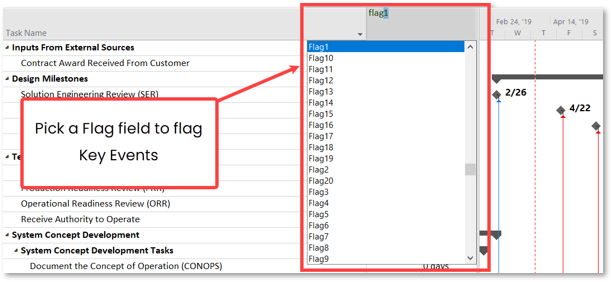
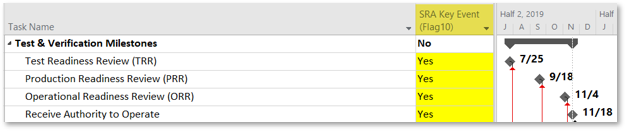
Key Events are the activities or milestones for which you want to evaluate schedule risk analysis results. To be recognized by the Schedule Risk Analysis Tool, Key Events must be flagged "Yes" in a designated Key Event flag field. While any task or milestone in the schedule can be identified as a Key Event, it is generally recommended that only the most significant project milestones, decision points, or deliverables be selected.
To mark activities in your schedule as “Key Events” complete the following steps:
Pick one of Microsoft Project’s Task Flag fields to use to mark these activities.
Set this flag = “Yes” on each activity you consider to be a key event*.
In the flag field chosen, only Key Events should be flagged “Yes”. Everything else in the schedule should be flagged “No”.