On the Task Information and Resource Information tabs of the SPD Exporter, there are certain options contain ellipses buttons next to them. Clicking any of these buttons will open the SPD Cross References Dialog
Cross Reference Type Tabs
Use these tab controls to chose which Cross Reference Type to edit. The following options are available:
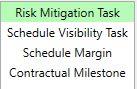
These tab controls show the constant values of the selected Cross Reference Type. For example, An SPD can contain the following values for Task Subtype: Risk Mitigation Task, Schedule Visibility Task, Schedule Margin, and Contractual Milestone (as pictured). Select which value you would like to add possibilities to.
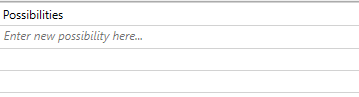
You can use the possibilities table to enter the different monikers you use in your schedule to represent the Cross Reference Value. For example, in your schedule, you may use the value SVT to indicate the Task Subtype Schedule Visibility Task. In this case, you would enter SVT to the possibilities list for the Schedule Visibility Task value under the Task Subtype tab.
Note: after adding a possibility, press the Enter key on the keyboard to accept the change.


 buttons next to them. Clicking any of these buttons will open the