After the Handoff Linker has completed linking Handoffs in the Master Project, the option to download a "link log" will be presented:
If the "Yes" option is selected, the Link Log will automatically be opened in an Excel. The Link Log Workbook will contain three worksheets:
Found Links
The Found Links worksheet will contain information about all Handoffs where at least one Giver (predecessor) and one Receiver (successor) were found with the same Handoff Code. this worksheet will show details about the Giver and the Receiver and if they were successfully able to be connected to each other.
The worksheet contains the following data points:
The Handoff Code of the Giver/Receiver pair
The Unique ID (as it is in the Master Project) of the Giver and Receiver that were connected
The name of the Giver and Receiver that were connected
True or False if the connection was successful
A message describing the success or failure of the connection.
If the connection attempt was unsuccessful, the reason why the Handoff could not be connected will be listed in this column. The most common reason why handoffs cannot be connected is because they would create a circular dependency relationship. This message will be displayed as "Link error: These tasks can't be linked because they're already linked through another task chain".
Missing Givers
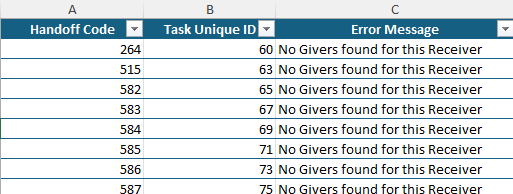
The Missing Givers worksheet will show all Receivers that did not have a corresponding Giver.
The worksheet contains the following data points:
The Handoff Code of the Receiver
The Unique ID (as it is in the Master Project) of the Receiver
A message indicating the error.
Missing Receivers
The Missing Givers worksheet will show all Givers that did not have a corresponding Receiver.
The worksheet contains the following data points:
The Handoff Code of the Giver
The Unique ID (as it is in the Master Project) of the Giver