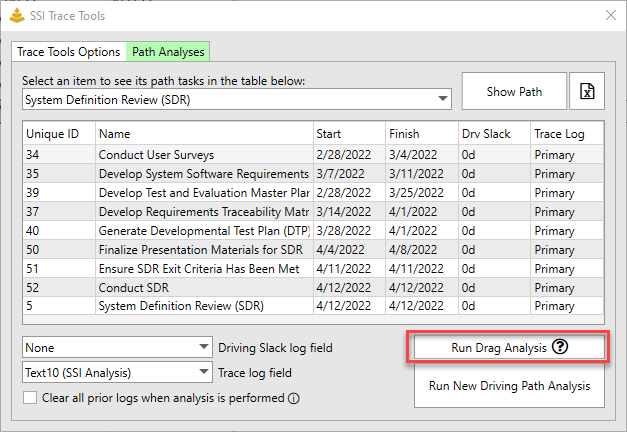
Critical or Driving Path Drag is the amount of opportunity (measured in days) Critical or Driving path tasks have to accelerate the focus item if their remaining duration is set to zero. You can calculate this automatically to any driving path in your schedule using the Drag Analysis feature on the SSI Trace Tools. A detailed video explanation of how to use this feature can be seen here.
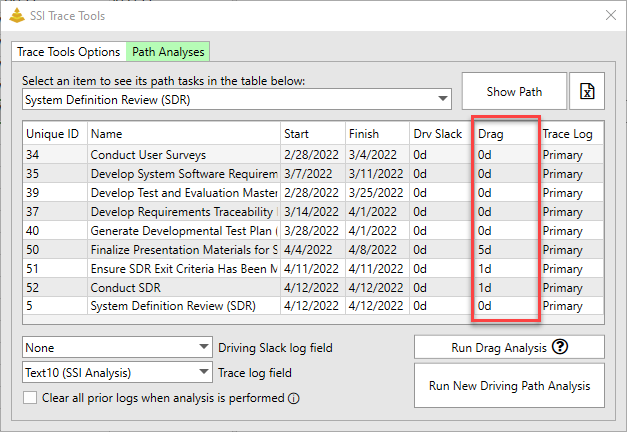
After the drag analysis has been performed, an additional column will be added to the table of the path currently selected in the Path Analyses tab.
Utility
A Drag Analysis is useful because it shows which tasks on the path the project team can focus on finishing earlier to accelerate the finish date of the focus item (in this example, System Definition Review) and which tasks would have no impact even if their finish date were to occur earlier. This allows the project team to more carefully plan the usage of their resources.
In the example above, we see that of all the tasks on the driving path, Finalize Presentation Materials has the greatest opportunity to accelerate the finish date of System Definition Review. If the remaining duration of Finalize Presentation Materials were set to zero, System Definition Review would finish 5 days earlier. Given this information the program team may then focus on allocating more resources to Finalize Presentation Materials in order to accelerate the completion of System Definition Review.