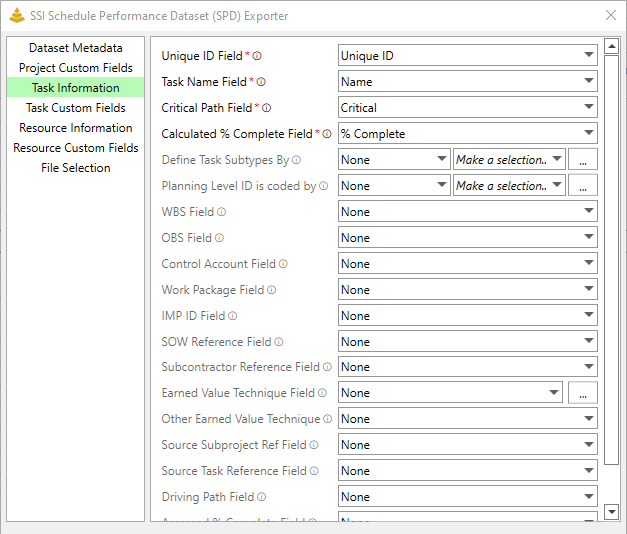
The Task Information tab contains all options for task-level information that will be included in the SPD.
Field
Description
Required?
Unique Id *
Provide a unique ID for the task. This ID must remain the same across each dataset submission related to tasks and assignments. Unique ID is the default value for this field but you can enter any Text field that contains a Unique value for each task in the schedule.
Yes
Name *
Provide a name for the task. Name is the default value.
Yes
Critical Path *
Enter a Text of Flag Field showing a task is on the project's critical path. Critical is the default value.
Yes
Calculated % Complete *
Provide the field used for the calculated percent complete for the task. % Complete is the default value
Yes
Task Subtypes
Indicate the field that identifies the task subtype. Task subtypes can be one of four values:
Risk Mitigation Task
Schedule Visibility Task
Schedule Margin Task
Contractual Milestone
You must also identify the comparison type for this value. Options include:
Equals
Contains
Starts With
Ends With
In order for the SPD Generator to recognize the monikers used for these values, You must cross reference your conventions with the SPD Cross-References dialog.
No
Planning Level ID
Indicate the field that identifies the task planning level ID. Task Planning Level IDs can be one of four values:
• Summary Level Planning Package
• Control Account
• Planning Package
• Activity
You must also identify the comparison type for this value. Options include:
• Equals
• Contains
• Starts With
• Ends With
In order for the SPD Generator to recognize the monikers used for these values, You must cross reference your conventions with the SPD Cross-References dialog.
No
Work Breakdown Structure (WBS)
Provide the field that contains the lowest-level WBS element with which the task is associated, if applicable.
No
Organizational Breakdown Structure (OBS)
Provide the field that contains the lowest-level OBS element with which the task is associated, if applicable.
No
Control Account
Provide the field that contains the control account or summary level planning package with which the task is associated, if applicable.
No
Work Package
Provide the field that contains the work package or planning package with which the task is associated, if applicable.
No
Integrated Master Plan (IMP) ID
Provide the field that contains the lowest-level IMP element with which the task is associated, if applicable.
No
Statement of Work (SOW) Reference
Provide the field that contains a reference to the section(s) of the SOW with which the task is associated, if applicable.
No
Subcontractor Reference
Provide the field that contains a reference to the subcontractor with which the task is associated, if applicable.
No
Earned Value Technique
Indicate the field that identifies the task planning level ID. Task Planning Level IDs can be one of four values:
• Apportioned Effort
• Level of Effort
• Milestone
• 0/100
100/0
X/Y
Percent Complete
Standards
Units
Other Discrete
In order for the SPD Generator to recognize the monikers used for these values, You must cross reference your conventions with the SPD Cross-References dialog.
No
Other Earned Value Technique
If the technique indicated by Earned Value Technique Field is "Other Discrete" or "Fixed X/Y", provide the field that contains a short description for the technique in this field.
Conditional
Source Subproject Reference
Provide the field that contains a reference to the source subproject in the scheduling software, if applicable. This field is only intended to be used if the source of the dataset is a schedule that incorporates one or more subprojects. In practice, the subproject reference may be an ID, name, file name, file path, etc., depending on the source software.
No
Source Task Reference
Provide the field that contains a reference to the source task in the scheduling software, if applicable. This field may be used if, for whatever reason, the ID of the task in the dataset does not provide a convenient means of locating the same task in the source data. The source task reference may be automatically generated or user defined, globally unique or context dependent, and constant in time or variable with time, depending on the source software.
No
Driving Path
Provide the field that identifies if a task is on the driving path.
No
Assessed % Complete
Provide the field that contains the assessed Percent Complete for Earned Value entered as a whole number between 0 and 100. Any value less than 0 will become 0. Any values greater than 100 will become 100.
No
Comments
Provide the field that contains any comments about the task.