SSI Tools for Microsoft Project

User guide

×
Menu
Index

SSI Watchlist Default Settings Form

 
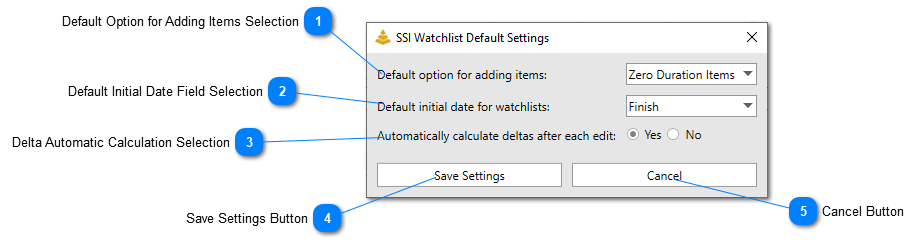
The default settings of the SSI Watchlist Tool can be adjusted from the SSI Watchlist Default Settings form.
 
SSI Watchlist Default Settings Form
1

Default Option for Adding Items Selection

1. Default Option for Adding Items Selection
This selection controls what option will be chosen for adding items to the Watchlist by default.
2

Default Initial Date Field Selection

2. Default Initial Date Field Selection
This option controls which date field will be selected by default as the initial date field to watch.
3

Delta Automatic Calculation Selection

3. Delta Automatic Calculation Selection
this option controls whether or not the current finish dates and delta values will be calculated in real time after each edit. If this option is set to No, these values will only be updated when the Refresh button is clicked
4

Save Settings Button

4. Save Settings Button
Clicking this button will save the selections made. Note that some of the Watchlist settings are saved at the project level, which means the Project file must be saved in order for the settings to be remembered.

5

Cancel Button

5. Cancel Button
Clicking this button will close the SSI Watchlist Default Settings form without saving any selections made.
Made by Dr.Explain, software documentation tool