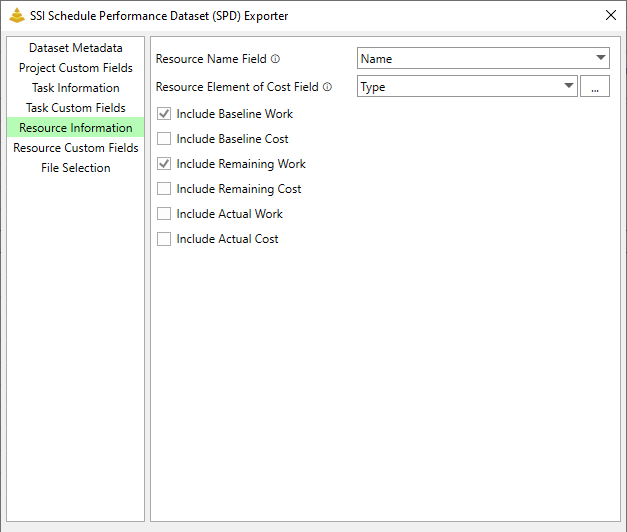
The Resource Information tab contains all options for resource-level information that will be included in the SPD.
Field
Description
Required?
Name *
Provide the field that contains the name for the resource. Name is the default value
Yes
Element of Cost *
Indicate the field that identifies the resource Element of Cost. Resource Element of Costs can be one of four values:
Labor
Material
Other Direct Costs
Subcontract
In order for the SPD Generator to recognize the monikers used for these values, You must cross reference your conventions with the SPD Cross-References dialog.
Yes
Other options available on this tab include:
Include Baseline Work: If checked, resource assignment baseline work will be included in the SPD.
Include Baseline Cost: If checked, resource assignment baseline cost will be included in the SPD.
Include Remaining Work: If checked, resource assignment remaining work will be included in the SPD.
Include Remaining Cost: If checked, resource assignment remaining cost will be included in the SPD.
Include Actual Work: If checked, resource assignment actual work will be included in the SPD.
Include Actual Cost: If checked, resource assignment actual cost will be included in the SPD.
Note: Most organizations do not capture actual work or cost within Microsoft Project. Instead actuals are collected by the organization's timekeeping system. Microsoft Project will automatically calculate actual work and cost as tasks progress through time, but we often disregard them for this reason.