Importing Actual Values for Earned Value Reporting
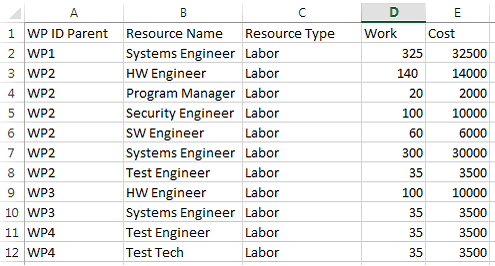
When using Task Work or Task Cost as the Earned Value Unit of Measure, you can override Microsoft Project’s actual values by Importing Cumulative Actual Values from an Excel worksheet. You can import values for each Work Package or you can import values at the Work Package Parent level. The simple format for a worksheet contains imported values is as follows:
· Work Package or Work Package Parent ID
· Resource Name
· Resource Type (Labor, Material, Travel, Other Direct Cost for example)
· Cumulative Work amount
· Cumulative Cost amount
Below is an example of a worksheet in excel containing Actual values for a project