Structured Solutions Assignment Conversion Tools changes existing resource assignments in a project on Completed tasks, In-progress tasks and tasks that have not started. Baseline and Remaining Work, Cost, Dates, Duration and in-progress Performance remain the same in the project after the conversion is complete. This tool does not address Actual Work and Cost.
Importing a Conversion Table
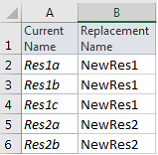
SSI Assignment Conversion tools can read a simple two-column table showing the name of resources currently assigned to tasks in a project (Current Resource Names) in column “A” and the replacement resource name (Replacement Resource Name) in column “B”. The From/To conversion table can be read into the active project’s resource sheet to create a conversion map from a current resource name to its replacement resource name and resource ID. Once the active project’s resource table is mapped to the replacement resources, you are ready to convert assignments.
Example Resource Assignment Conversion Table
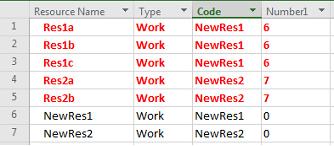
The user can pick a Resource Text and Number field (using Code and Number1 in this example) to map current resource names to their respective replacement.
After Importing the two-column table into the active project’s resource sheet, each resource name will display its corresponding replacement resource name (In the Code field in this example) and ID (In Number1 in this example)
Replacement resources are added to the resource sheet if they don’t already exist. In this example, the replacement resources were added as Resource IDs 6 and 7
Convert Resource in the Active
Just Click Convert Assignments on Selected Tasks to complete the conversion
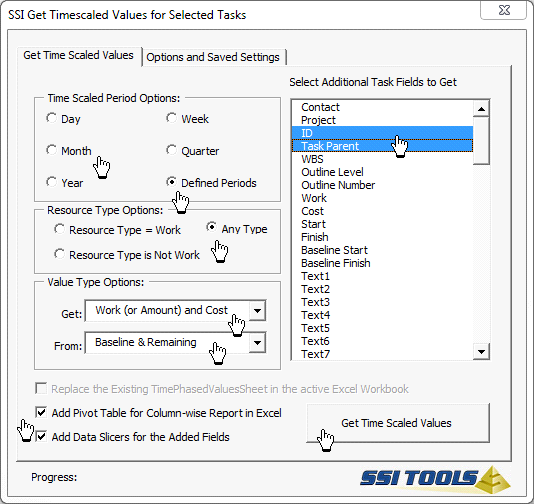
Generate a Before and After Time Scaled Values report using SSI Tools Get Time Scaled Values tools to validate Baseline and Remaining work and cost after the conversion is complete.