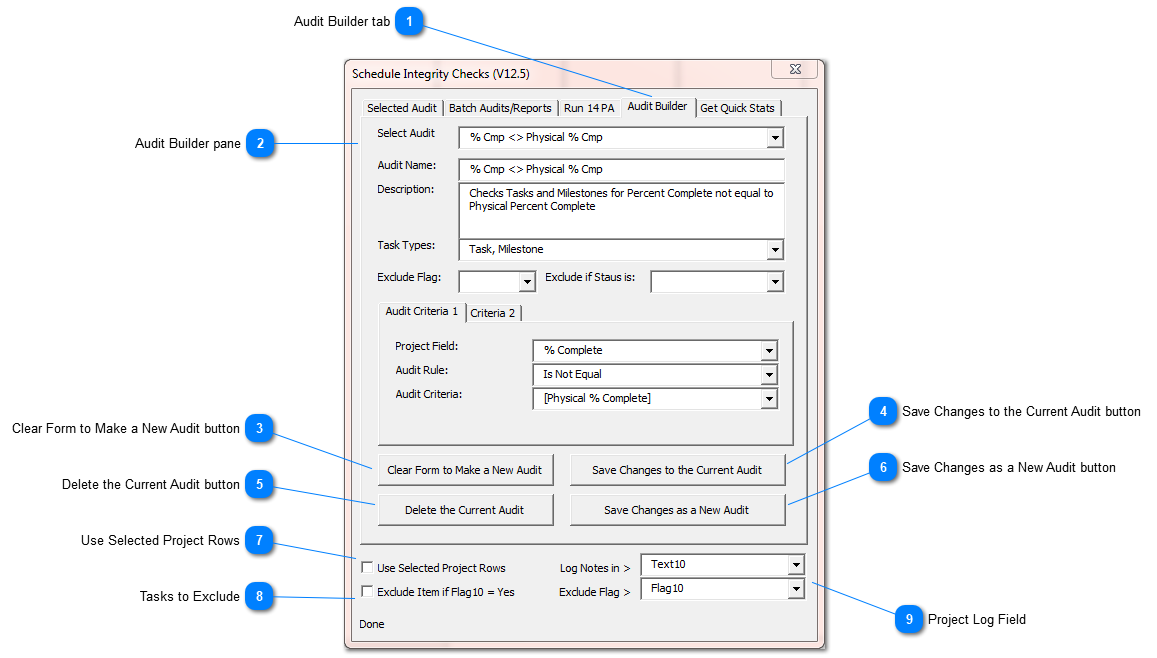
The Audit Builder allows users to pick from a list of pre-defined audits that can change if needed. A user can update the list of audits shown by SSI Tools by deleting unwanted audits or adding new ones.
User defined Audits are saved in a viewable, editable file named “SSI_UserDefinedAudits.xlsx”. This file is located in the installation directory of SSI Tools (C:\SSI_Tools\ SSI_UserDefinedAudits.xlsx) by default. SSI recommends that you backup this file if you intend to edit its content. A backup of this file is also included in the Backup folder below the SSI Tools installation folder.
SSI Tools includes some Audit conditions that are not available in Microsoft Project filters (such as “Is Not Unique” “Is Contained Within”, “Begins With”, “Ends With”).
The structure of a User Defined Audit must include:
Audit Name and AuditDescription
Task Types to inspect (Tasks, Milestones and Summaries)
Audit Criteria 1 with a Project Field, Audit Rule and Audit Criteria
User Defined Audits may also include:
Audit Criteria 2 (with an And or an Or condition for the second criteria). If using the And condition, both conditions must be true for the item to be reported. If using the Or condition, either condition will cause the item to be reported.
Flag or Status Exclusions
Exclude Flag - exclude tasks with a flag value = Yes
Exclude if Status is – exclude tasks depending on their current progress or completion status
The structure of a User Defined Audit must include:
Audit Name and AuditDescription
Task Types to inspect (Tasks, Milestones and Summaries)
Audit Criteria 1 with a Project Field, Audit Rule and Audit Criteria
User Defined Audits may also include:
Audit Criteria 2 (with an And or an Or condition for the second criteria). If using the And condition, both conditions must be true for the item to be reported. If using the Or condition, either condition will cause the item to be reported.
Flag or Status Exclusions
Exclude Flag - exclude tasks with a flag value = Yes
Exclude if Status is – exclude tasks depending on their current progress or completion status
Project Fields used for User Defined Audits
Project Field
Note on its Use
% Complete
% Work Complete
Active
Baseline(x) Duration
Replace the characters "(x)" with a number from 1 - 10
Baseline(x) Finish
Replace the characters "(x)" with a number from 1 - 10
Baseline(x) Start
Replace the characters "(x)" with a number from 1 - 10
Baseline Duration
Baseline Finish
Constraint Date
Constraint Type
Contact
Dependency Lag
Dependency To
Dependency From
Duration
Effort Driven
Estimated
Finish
Finish(x)
Replace the characters "(x)" with a number from 1 - 10
Flag(x)
Replace the characters "(x)" with a number from 1 - 10
Free Slack
Manual
Name
Number(x)
Replace the characters "(x)" with a number from 1 - 20
Outline Code(x)
Replace the characters "(x)" with a number from 1 - 10
Outline Level
Outline Number
Physical % Complete
Predecessors
Resource Names
Start
Start(x)
Replace the characters "(x)" with a number from 1 - 10
Successors
Text(x)
Replace the characters "(x)" with a number from 1 - 30
Total Slack
Type
WBS
Conditions used for User Defined Audit Rules
Audit Rule
Note on its Use
Begins With
Can be used with text, code, number and date project fields
Does Not Begin With
Can be used with text, code, number and date project fields
Contains
Can be used with text, code, number and date project fields
Does Not Contain
Can be used with text, code, number and date project fields
Is Contained Within
A value in a project field is contained with a text string entered by the user. For example, the constraint type “Must Start On” is contained within this text string “Must Start On, Must Finish On, Start No Later Than, Finish No Later Than”
Ends With
Can be used with text, code, number and date project fields
Does Not End With
Can be used with text, code, number and date project fields
Equals
Can be used with text, code, number and date project fields
Is Not Equal
Can be used with text, code, number and date project fields
Is Greater Than
Can be used with text, code, number and date project fields. SSI Tools determines if the project field is a date, a numeric value or alpha characters for better handling of this condition
Is Greater Than or Equal to
Can be used with text, code, number and date project fields. SSI Tools determines if the project field is a date, a numeric value or alpha characters for better handling of this condition
Is Less Than
Can be used with text, code, number and date project fields. SSI Tools determines if the project field is a date, a numeric value or alpha characters for better handling of this condition
Is Less Than or Equal to
Can be used with text, code, number and date project fields. SSI Tools determines if the project field is a date, a numeric value or alpha characters for better handling of this condition
Is Not Unique
Can be used with text, code, number and date project fields
Is Null
Can be used with text, code, number and date project fields
Is Not Null
Can be used with text, code, number and date project fields
Project Fields used for User Defined Audit Criteria
Audit Criteria
Note on its Use
Values entered by the user
Text, Dates or Numbers
A value entered by the user by typing its value in the Audit Criteria field
Values taken from tasks or the project
[% Complete]
[% Work Complete]
[Active]
[Baseline(x) Duration]
Replace the characters "(x)" with a number from 1 - 10
[Baseline(x) Finish]
Replace the characters "(x)" with a number from 1 - 10
[Baseline(x) Start]
Replace the characters "(x)" with a number from 1 - 10
[Baseline Duration]
[Baseline Finish]
[Constraint Date]
[Constraint Type]
[Contact]
[Deadline]
[Dependency Lag]
[Duration]
[Effort Driven]
[Estimated]
[Finish]
[Finish(x)]
Replace the characters "(x)" with a number from 1 - 10
[Flag(x)]
Replace the characters "(x)" with a number from 1 - 20
[Free Slack]
[Manual]
[Name]
[Number(x)]
Replace the characters "(x)" with a number from 1 - 20
[Outline Code(x)]
Replace the characters "(x)" with a number from 1 - 10
[Outline Level]
[Outline Number]
[Physical % Complete]
[Predecessors]
[Resource Names]
[Start]
[Start(x)]
Replace the characters "(x)" with a number from 1 - 10
[StatusDate]
[Successors]
[Text(x)]
Replace the characters "(x)" with a number from 1 - 30
You can set a project flag field - "Yes" to create a permanent exclusion to the Audit inspection. Excluded tasks will be ignored by SSI Tools as it audits the project. You must also check the option named "Exclude Items if" to use the exclude feature.
Select a Project Text field for SSI Tools to log audit results. Make sure you select a text field not used for any other purpose since it will be overwritten by SSI Tools if you use this feature.