NOTE: Structured Solutions does NOT recommend using this method of integrating Subprojects into a Master Project. Instead, we recommend the "Unlinked" Method. See the bottom of this topic for more information.
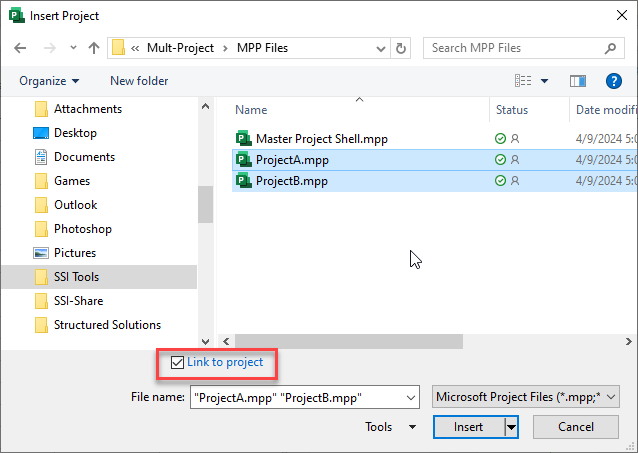
Subproject files can be inserted into a master project dynamically “linked” to its source file. To insert "linked" Subproject files into a Master Project file, leave the "Link to project" option checked when selecting files from the Subproject button:
When you insert a "linked" Subproject file into the Master Project, you are really just using the Master Project to view the contents of the Subproject. any changes that are made to tasks from the Subproject in the Master Project will automatically be reflected in the Subproject file and vise versa.
While this may sound nice on paper, in practice this method is known to cause many issues Here are a few:
The Master Project and Subprojects are very susceptible to file corruption. If you ever rename, move, overwrite or save the files on a WAN (Wide Area Network) you roll the file corruption dice. It's a matter of when not if one or more files corrupt.
"Linked" Subproject and master project files are much slower (take longer to calculate) and cumbersome to work in than unlinked files.
When delivering or moving an Master Project, you must also deliver/move the collection of Subproject files too.
The name and location of source and master files is significant. If a source Subproject file name is changed or its file is no longer accessible, its data in the Master Project will be incorrect or not available.
You cannot create revisions of Subproject files.
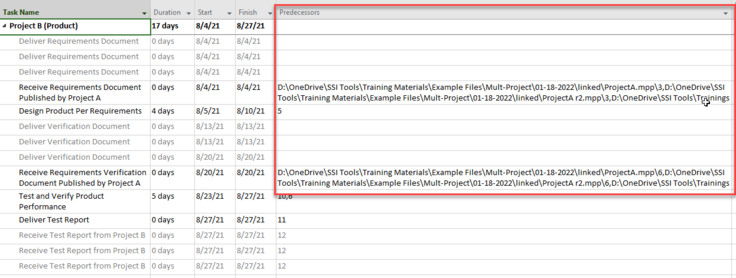
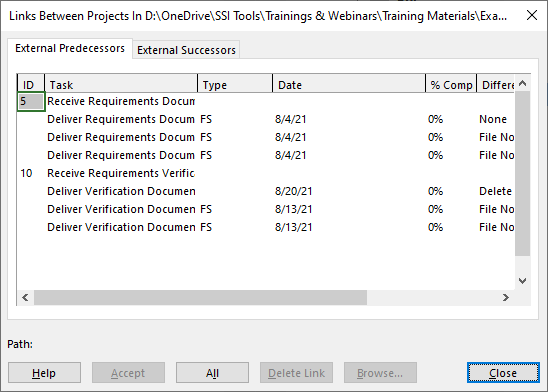
Linking a Predecessor from one Subproject to a Successor in another creates an External task in each Subproject. These links can make the project file unstable. If the data supporting either end of this Subproject-to-Subproject dependency becomes inaccessible, the form named Links Between Projects displays warnings concerning the source of the dependency.