A Connecting Path is a set of logically connected activities that join a defined starting and ending point together. A Connecting Path contains all logically connected activities that connect the start to the end, not necessarily the longest or shortest chain of dependencies between them. A Connecting Path does not focus on what drives the end point or what is driven by the starting point. It is solely concerned with how activities are linked between the two.
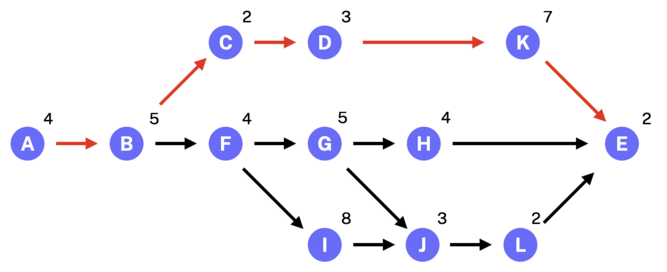
Observe the following diagram:
Diagrams like the one above are commonly used to teach the Critical Path Method (CPM), a scheduling technique used to identify the longest sequence of dependent tasks that drive a single focus point.
In this example, the goal is to reach Task E. The diagram illustrates various paths through the network of activities. By performing forward and backward passes, ultimately identify the Critical or Driving path—the sequence of tasks with zero float that directly drives the end point’s finish date, leads to a result like this:
Many software vendors, including SSI with its Directional Path Tool, have developed solutions that automatically calculate critical and driving paths. These tools focus on a single point of interest, identifying the logical chain of activities that either drive or are driven by that point.
However, there are situations where the goal isn’t just to analyze what comes before or after a specific task. Instead, you may want to understand how two distinct activities are connected within the schedule—tracing the full path of dependencies that links them together.
In the context of the diagram, assume Task A is not the first task in the overall schedule, and Task E is not the final activity. They are simply two intermediate tasks within a larger network of activities. Now suppose you want to understand how Task A is connected to Task E. What we’re really aiming to uncover is everything shown in the original diagram, a clear visualization of the entire logical path linking those two specific activities.