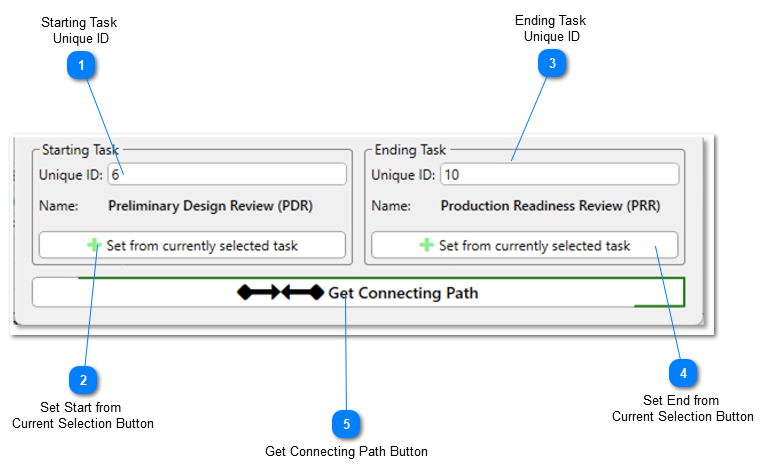
The lower section of the Connecting Path Tool form allows you to identify what activities will serve as the starting and ending points of the analysis. These controls are always displayed, no matter which tab at the top of the form is currently selected.
Starting Task Unique ID
This text box displays Unique ID of the starting point of the Connecting Path. A value can either be manually entered in the box or can be automatically set by clicking the Set from currently selected task button.
When a valid Unique ID has been populated in this textbox, the name of the activity that corresponds to that Unique ID will automatically appear.
Clicking this button will automatically populate the Starting Task Unique ID text box with the Unique ID of the activity currently selected in Microsoft Project.
This text box displays Unique ID of the ending point of the Connecting Path. A value can either be manually entered in the box or can be automatically set by clicking the Set from currently selected task button.
When a valid Unique ID has been populated in this textbox, the name of the activity that corresponds to that Unique ID will automatically appear.
Clicking this button will automatically populate the Ending Task Unique ID text box with the Unique ID of the activity currently selected in Microsoft Project.
Click this button to get the Connecting Path between the starting and ending points entered. This button cannot be pressed until a valid starting and ending activity have been identified.