|
Change Number
|
13.4.EXCEL01 – CEI History Report
|
|
Correction, Change or New feature
|
New Feature – Added CEI History report
|
|
Detailed Explanation
|
Dangling Start and Dangling Finish now check for no predecessors (included as a dangling start) and no successors (included with dangling finish)
|
|
Build Release
|
07/15/2020
|
|
|
|
|
Change Number
|
13.4.EXCEL02 – SnapPeriod Calculation
|
|
Correction, Change or New feature
|
Change - Determination of SnapPeriod in Prior Version. & Changed options for CEI Calculation
|
|
Detailed Explanation
|
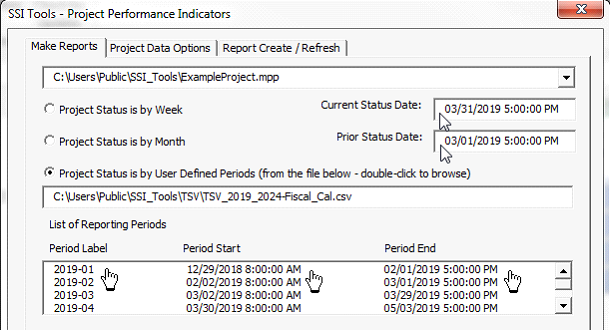
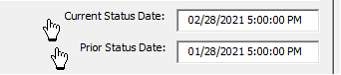
· SnapPeriod = 1 only if the Snapshot Finish Date is greater than the Prior Status Date and <= Current Status Date as shown below by the Arrowheads
· Determination of SnapPeriod in Updated Version
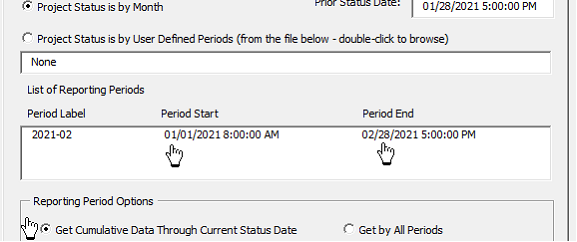
SnapPeriod = 1 only if the Snapshot Finish Date is greater than Period Start and <= Period End relative to each reported period. Shown by the Pointing Finger below
1. Changed Options for CEI Calculation
· Prior Version had: Count Actual Finishes Only if Snapshot is Before Status Date
· Updated Version changed this to: Count Actual Finishes Only if Snapshot and Actual are in the Same Period
This ensures that the only tasks being evaluated, the CEI Denominator, are the tasks with a snapshot in the same period under inspection. The prior version would have counted tasks with an actual finish even if the snapshot was in a prior period
· Prior Version had: Count Actual Finishes Even if Snapshot is After Status Date
· Updated Version changed this to: Count Actual Finishes Even if Snapshot and Actual are in Different Periods
This counts the number of tasks with a Snapshot Finish in each period separately from tasks with an Actual Finish in each period.
|
|
Build Release
|
13.4 - 08/15/2020
|
|
|
|
|
Change Number
|
13.4.EXCEL03 – Check for Updates
|
|
Correction, Change or New feature
|
New feature – Implemented Check for Updates
|
|
Detailed Explanation
|
Check for updates reads a file on the SSI Tools server with the most current version. If installed version is earlier than the current version, the user is able to download the new version.
|
|
Build Release
|
13.4 - 08/15/2020
|
|
|
|
|
Change Number
|
13.4.EXCEL04 – Lookup Date in Project
|
|
Correction, Change or New feature
|
New feature – Added a feature to lookup data in the active project file
|
|
Detailed Explanation
|
This feature reads the Unique ID from the last column and looks up data in the active project file if the next column titles match MS Project titles
|
|
Build Release
|
13.4 - 08/15/2020
|
|
|
|
|
Change Number
|
13.4.EXCEL05 - Lookup Data in Project Error Handler
|
|
Correction, Change or New feature
|
Correction – Lookup Data in a Project would fail if the procedure went to its error handler and no project object had been set
|
|
Detailed Explanation
|
Error handler now determines if the project object had been set.
|
|
Build Release
|
13.4.1 - 08/23/2020
|
|
|
|
|
Change Number
|
13.4.EXCEL06 – BEI Calcs and Date Ranges for All Periods
|
|
Correction, Change or New feature
|
Correction – BEI Actual count overstated. Monthly Start date for Feb of any year showed 1/28/YY or 1/29/YY instead of the last date in January.
|
|
Detailed Explanation
|
In the 11-01-2020 and earlier version, the BEI Actual (column AE in Performance Data overstated the number of tasks with a BEI Actual date in the period because it would count tasks having an actual finish in a later period when running a “All Periods” report.
For example, if a task had a Baseline Finish in January 2021 and an actual finish in Feb 2021 and the project’s status date is in March 2021, BEI Actual would show a count in January and in February like this:
|
Period
|
Finish
|
BL_Finish
|
BEI_Baselined
|
BEI_Actual
|
|
2021-01
|
2/4/2021 17:00
|
1/28/2021 17:00
|
1
|
1
|
|
2021-02
|
2/4/2021 17:00
|
1/28/2021 17:00
|
|
1
|
In this example, it should only show a BEI Actual in February like this:
|
Period
|
Finish
|
BL_Finish
|
BEI_Baselined
|
BEI_Actual
|
|
2021-01
|
2/4/2021 17:00
|
1/28/2021 17:00
|
1
|
|
|
2021-02
|
2/4/2021 17:00
|
1/28/2021 17:00
|
|
1
|
Also the Monthly Start date for Feb of any year showed 1/28/YY or 1/29/YY instead of the last date in January.
|
|
Build Release
|
13.4.7 – 01-19-2021
|
|
|
|
|
Change Number
|
13.4.EXCEL06 – CEI Actual Determination
|
|
Correction, Change or New feature
|
Correction – Incorrect determination of CEI Finish status. CEI History pivot table updated
|
|
Detailed Explanation
|
Tasks finishing in their CEI Finish period were not recorded as CEI_Act (Column Q) in the Excel PerformanceData sheet. CEI History pivot table was updated to show a second scale for CEI calculation
|
|
Build Release
|
13.4.3 - Not Released - Added to 13.4.4
|
|
|
|
|
Change Number
|
13.4.EXCEL07 - Lookup Data in Project Messages
|
|
Correction, Change or New feature
|
Change – New user messages for Lookup Data in a Project and the text "Invalid Field Name" and "Task UID not Found" are no longer entered in worksheet cells
|
|
Detailed Explanation
|
A message lets the user know which fields are valid and which are invalid. Yellow highlights let the user know if any Unique Id was not found in the active project
|
|
Build Release
|
13.4.3 - Not Released - Added to 13.4.4
|
|
|
|
|
Change Number
|
13.4.EXCEL08 – Use the active project as the project object
|
|
Correction, Change or New feature
|
Change – the active project is the default project object unless the project selection control is changed
|
|
Detailed Explanation
|
The active project is the default project object unless the project selection control is changed. This change was required due to project server projects showing “<>/” as the project path.
|
|
Build Release
|
13.4.3 - Not Released - Added to 13.4.4
|
|
|
|
|
Change Number
|
13.4.EXCEL09 – Location of QBD Database
|
|
Correction, Change or New feature
|
Correction – Location of QBD Database was not found if using a location other than the default
|
|
Detailed Explanation
|
If the user changes the location of the QBD Database the new location is recorded in the windows registry at HKCU "SSI_AnalysisDBTools", "Setup", "txtQBDDB". The Status workbook reads this location and uses it for QBD step information.
|
|
|
|
|
Change Number
|
13.4.EXCEL10 –CEI Calculation in a Cumulative Report
|
|
Correction, Change or New feature
|
Change – Changed the CEI Calculation period when running cumulative data reports
|
|
Detailed Explanation
|
Changed CEI Calculation method when running a cumulative report. The prior version counted all inception to date CEI finishes, rather than only the finishes in the current reporting period.
In the update version, CEI is only counted when a task’s snapshot or actual finish is between Prior Status Date and Current Status Date
In the prior version tasks were counted for CEI if they had a snapshot or actual finish between the Period Start and Period End. This period would span inception to date when running a cumulative report
|