Correction – Suggest EVT would only populate with X/Y instead of X value & Y value such as 10/90
Detailed Explanation
If the user did not have all the tasks selected, the suggested X/Y method would not generate the Numeric X and Y values.
Build Release
13.4.9 – 05/17/2021
Change Number
13.4.DECM09 – Missing EVT on Milestones
Correction, Change or New feature
Change – 10A102a "Are EVTs assigned to WPs?" reporting missing EVTs on tasks and milestones without WP id.
Detailed Explanation
Tasks and milestones without Work Package IDs were reported as missing EVTs. This change only marks missing EVTs if a task has a WP ID.
Build Release
13.4.9 – 05/17/2021
Change Number
13.4.DECM10 – Double-click to Select Prior Projects
Correction, Change or New feature
New feature – Added double-click to select prior projects for DECM 06A504a, 06A504b, 06A506c & 29I401a
Detailed Explanation
The user no longer needs to open the prior project files for certain DECM tests. This feature allows the user to browse to the prior reporting period project files.
06A504a, 06A504b, (Changes to Actuals Start/Finish)
06A506c (Tasks Riding the status date for 2 consecutive periods
29I401a (Are baseline dates being updated to mask legitimate variances?)
Build Release
13.4.9 – 05/17/2021
Change Number
13.4.DECM11 – Double-click to Save Settings
Correction, Change or New feature
New feature – Added double-click to save settings on any form with Setting selections drop-down lists
Detailed Explanation
The user can double-click the saved setting item on form tabs, Project Fields for EV, DECM Audit Batch, EV Performance Tools
Build Release
13.4.9 – 05/17/2021
Released Before 13.4.9
Change Number
13.4.DECM01 – Handler for Blank Baseline Cost and Work
Correction, Change or New feature
Correction – Added an error handler when Baseline Cost or Baseline Work is blank
Detailed Explanation
Even though Baseline Cost and Work should never be blank and should be numeric (zero of nothing), some users will have that condition in their schedule. An error handler was added to identify and handle this condition.
Build Release
13.4.1 - 08/23/2020
Change Number
13.4.DECM02 – Corrections for 06A504a & 06A504b Tests
Correction, Change or New feature
Correction – Incorrect condition for identification of changes to actual start and actual finish from prior period to current period
Detailed Explanation
Changed to actual start were detected but changed to actuals finish were not found.
Build Release
13.4.3 - Not Released - Added to 13.4.4
Change Number
13.4.DECM03 – Show when a prior period file and critical path analysis settings are required
Correction, Change or New feature
Correction – Show controls for selecting prior project files and critical path settings after selecting saved settings.
Detailed Explanation
When a user selected saved settings that require prior project files or critical path settings, those hidden fields were not shown.
Build Release
13.4.3 - Not Released - Added to 13.4.4
Change Number
13.4.DECM04 – Punctuated and Concatenated Fields
Correction, Change or New feature
Change – Correct CA/WP IDpunctuated feature andAllow Concatenated Fields for CA and WP ID
Detailed Explanation
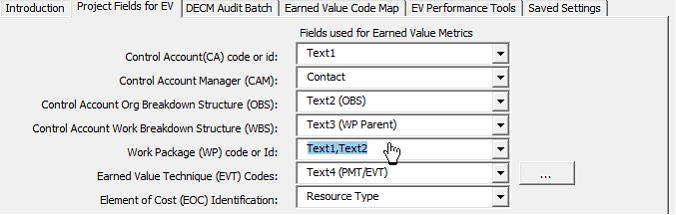
When a user selects the same field for CA and WP ID, a prompt is given asking for the punctuation mark used to separate CA from WP ID. CA1.1.WP001 is an example of a punctuated CA/WP code using a dot as the punctuation mark. In this example, the last punctuated value is used for the WP ID and everything else is the CA. Therefore, CA1.1 is the CA and WP001 is the WP ID
Additionally, the user can enter two or more fields (separated by a comma) to concatenate a CA or WP ID. For example, if Text1 = CA1.1 and Text2 = WP001, the user can enter Text1,Text2 resulting in a Work Package code of CA1.1.WP001
Build Release
13.4.5 – 12/09/2020
Change Number
13.4.DECM05 – X/Y In > 2 Periods
Correction, Change or New feature
Change – Correct the procedure that determines if a WP is in more than two periods.
Detailed Explanation
An evaluation was using current finish when it should have been using baseline finish.
In GetPeriods this line: “If tFinish > CDate(LineItems(2)) Then” used If t.Finish which is the current finish rather than the baseline finish
Build Release
13.4.8 – 04-24-2021
Change Number
13.4.DECM06 – Get PMT from Summary Task
Correction, Change or New feature
Change – Override the PMT PoP (10A103a > 1 period for 0/100 and 10A104a > 2 periods for X/Y) using the baseline PoP of Summary tasks that have CA, WP and PMT
Detailed Explanation
Check all tiered parents of a task with a WP and CA. If a parent is found with a Control Account, Work Package matching the task, then the PMT for the task is taken from the parent (summary)
Build Release
13.4.8 – 04-24-2021
Change Number
13.4.DECM07 – Evaluate Work Package IDs within their respective CA for test 12A201a
Correction, Change or New feature
Change – Column H of DECM Data table includes CA plus “-“ plus WP ID to enable the same WP ID to be used in different CAs
Detailed Explanation
DECM test 12A201a Identifies Work Packages (WPs) with a mixture of tasks that are LOE and tasks that are not LOE. The prior version inspected all tasks with the same WP ID regardless of their Control Account (CA). This change inspects WPs within their respective CA. Therefore, a finding occurs only if two or more tasks, in the same CA, have the same WP ID and a mixture of LOE and non-LOE.