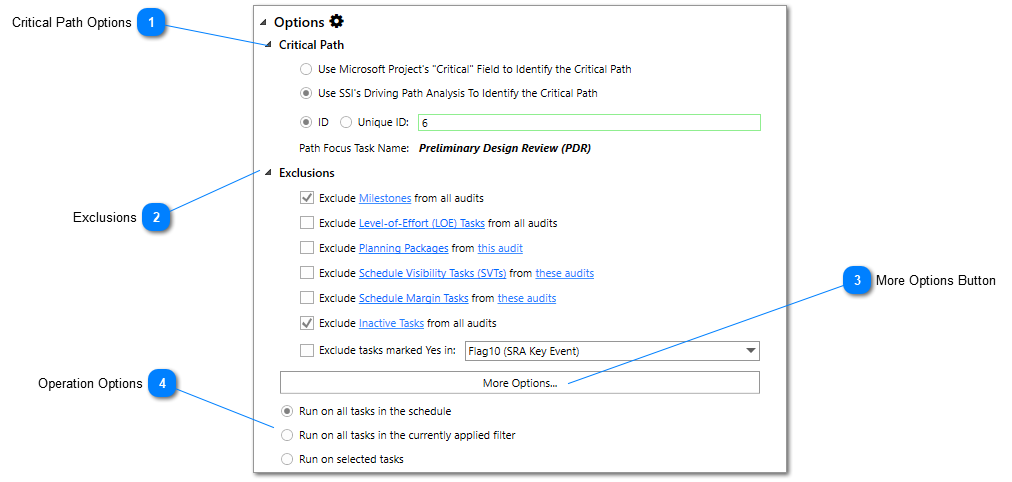
Quick options can be accessed by expanding the Options Section of the SSI 14 Point Assessment Tool. These are the primary options users will want to review prior to running the 14 Point Assessment.
Critical Path Options
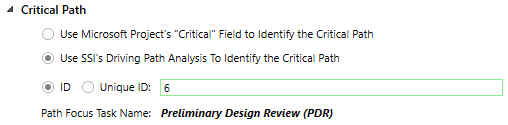
The SSI 14 Point Assessment tool needs to know how the critical/driving path will be identified for in order to perform the Critical Path Test and Critical Path Length Index. The following options are available:
Use Microsoft Project’s “Critical” Field – If this option is selected, SSI will use the item with the latest start date marked “Yes” in the Critical field as the focus item for the critical path analysis.
Use SSI’s Driving Path Analysis – This option will allow the user to explicitly identify which task/milestone will be used as the focus item for the Driving Path Analysis. If you select this option, you will be asked to provide the ID or Unique ID of the item in the schedule that the Driving Path Analysis will be conducted on. The focus item cannot be a summary task.
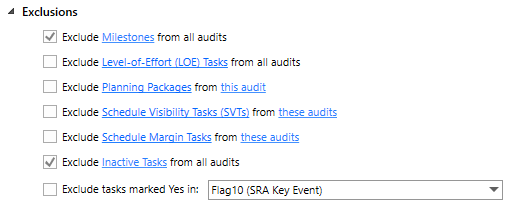
Users have options to exclude certain task types from some or all of the 14 Point Assessment audits. There are various legitimate reasons why certain items may be excluded from evaluation. The following options are available:
Exclude Milestones from all audits – In DCMA’s documentation, they evaluate tasks with duration but not milestones.
Exclude Level-of-Effort (LOE) tasks from all audits – Level-of-Effort tasks represent support activities that are unique to discrete tasks. LOE tasks are permitted to be long in duration and should not be linked to any discrete work in the schedule.
Exclude Planning Packages from the High Baseline Duration audit – Planning packages are future tasks that have not been planned in full detail yet in the schedule. Because these tasks are often broad generalizations of large amounts of scope, they are usually quite long in duration. DCMA recognizes that these tasks are intended to represent work in the distant future that will be broken down into shorter discrete activities at some point during the Project’s life cycle.
Exclude Schedule Visibility Tasks (SVTs) from the High Baseline Duration and No Work or Cost audits – Schedule Visibility Tasks are tasks included in the schedule for “visibility purposes only”. They usually have no resources assigned, and they are not part of the program’s scope of work. These tasks often represent “wait times” like a Government Review or material lead-time.
Exclude Schedule Margin Tasks from the High Baseline Duration and No Work or Cost audits – Schedule Margin Tasks are tasks in the schedule that represent the time necessary to account for estimated schedule risks/uncertainties. DCMA is aware these tasks may be long in duration and will not contain resources.
Exclude Inactive Tasks from all audits – Inactive tasks are tasks marked as “Inactive” in Microsoft Project. A task can only become inactive if it is specifically set to that state by the Microsoft Project user. Note: the feature to mark tasks inactive only exists in Microsoft Project Professional and is not available in Microsoft ProjectStandard versions.
Exclude Tasks marked “Yes” in a user defined Flag Field. – There may be tasks in the schedule that the program team has determined unnecessary to be analyzed as part of the 14 Point Assessment for various reasons. If these reasons are accepted by DCMA, these tasks can be flagged “Yes” in any of the available flag fields and excluded from the analysis.
Users can select what tasks will be evaluated when the 14 Point Assessment runs by selecting one of the following options:
Run on all tasks in the schedule - This option will ensure that every task in the schedule is evaluated (except for tasks that have chosen to be excluded) when the 14 Point Assessment runs, regardless of what is currently selected or if a filter is applied to the Gantt Chart.
Run on all tasks in the currently applied filter – This option will ensure that only tasks that are within the view of the currently applied filter will be evaluated (except for tasks that have chosen to be excluded) when the 14 Point Assessment runs, regardless of what is currently selected.
Run on selected tasks – This option will ensure that only tasks that are currently selected in the Gantt Chart will be evaluated (except for tasks that have chosen to be excluded) when the 14 Point Assessment runs.