Correction – Data type mismatch error using Cost resource type.
Detailed Explanation
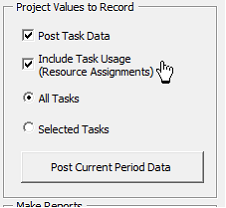
In the prior version, a task with a Cost resource type would cause a Data type mismatch error if the user selected the option to Include Task Usage (Resource Assignments) since Assignment level work is null and the database is expecting a numeric value. Nulls are now replaced with zero for Assignment Work, Cost, Actual Work & Cost, Baseline Work & Cost, Remaining Work & Cost.
Build Release
13.4.9 – 05/17/2021
Released Before 13.4.9
Change Number
13.4.EVM01 – Correction of PV in Work Report
Correction, Change or New feature
Correction – PV Work hours was not correct for in-progress tasks
Detailed Explanation
When a work package is in-progress, SSI Tools calculates the amount of elapsed baseline work, cost and duration. The calculation for elapsed work was incorrect causing PV hours to be overstated.
The variable used to accumulate baseline work (tBCWS_Work ) through the status date in the module PostTaskData was using tBCWS_Cost
Build Release
13.4.5 12-09-2020
Change Number
13.4.EVM02 – Handling of Resource Assignment Delay
Correction, Change or New feature
Correction – Assignments with delayed start could cause an error calculating in-progress BCWS work and cost
Detailed Explanation
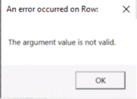
If a task has an in-progress baseline and one or more of its resource assignments has a delayed start, it could cause the assignment start date to be later than the status date. This will cause “The argument value is not valid” error since SSI Tools is attempting to get BCWS from assignment start to status date and status date is earlier than assignment start.
Change Number
13.4.EVM03 – SPA Chart
Correction, Change or New feature
Correction – Incorrect reporting of BCWP for X/Y EVT that started and finished in the same period. First period missing in dataset with only one task selected.
Detailed Explanation
In the prior version, a task with an X/Y EVT that started and finished in the same period would only get the finish performance value instead of both the X and Y values in the same period.
If the user selected one task, it may not have included the first reporting period in the SPA report.