The tab named QBD Step Template is where you will:
Make a QBD Template for a New Task Type
Add or Edit or Delete Existing Steps
Import QBD Task Templates from Excel
Show QBD Steps for an existing Template
Figure 11 Make QBD Step Templates
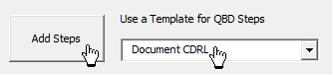
After you make a QBD Step Template, you can add those steps to any task using the form named QBD in Active Project.
Figure 12 Use a Template for QBD Steps on the form named QBD in Active Project
Working Directly in the SSI_Analysis_DB with QBD Steps
SSI Tools uses a Database to keep its catalog of QBD Steps by Project Title and Task Unique ID. If either of these changes, you can open the database directly in Microsoft Access by finding the file named “SSI_Analysis_DB.mdb”. In the example below, that database will be located in the system folder “C:\Users\Public\SSI_Tools\”. QBD Steps are found in the table named “QBD_Steps” and QBD Step Templates are in the table named “QBD_StepTemplate”. Either of these can be opened much like a worksheet in Microsoft Access by double-clicking the table name in the list of Access Objects.
Figure 13 Location of SSI_Analysis_DB for QBD Steps