|
Change Number
|
13.4.SSI01 – Split Schedule Integrity Audit button
|
|
Correction, Change or New feature
|
Change – Made split buttons for Schedule Integrity Audits
|
|
Detailed Explanation
|
Changed the button for Schedule Integrity Audits to a split button for DECM and Classic Audits. Changed Button name to Schedule Health/Audits
|
|
Build Release
|
13.4 - 08/15/2020
|
|
|
|
|
Change Number
|
13.4.SSI02 – Standalone Progress Bars and Non Modal Forms
|
|
Correction, Change or New feature
|
Change – Implemented standalone progress bars for Time Scaled Values, Schedule Integrity Audits, SRA, Sensitivity Analysis and SSI EV Tools. This enabled forms to be set to nonmodal which allows the user to interact with MS Project while the form is open
|
|
Detailed Explanation
|
A message lets the user know which fields are valid and which are invalid. Yellow highlights let the user know if any Unique Id was not found in the active project
|
|
Build Release
|
13.4 - 08/15/2020
|
|
|
|
|
Change Number
|
13.4.SSI03 – 4 digit year format
|
|
Correction, Change or New feature
|
Change – Changed all date formats to “YYYY”
|
|
Detailed Explanation
|
Date formats that had been 2 digits (“YY”) have all been changed to 4 digits (“YYYY”)
|
|
Build Release
|
13.4.1 - 08/23/2020
|
|
|
|
|
Change Number
|
13.4.SSI04 – trial license key
|
|
Correction, Change or New feature
|
Change – Added support for trial license keys
|
|
Detailed Explanation
|
Enabled a trial license key with key values that determine length of the trial period up to 75 days
|
|
Build Release
|
13.4.2 - 08/28/2020
|
|
Change Number
|
13.4.SSI05 – Split buttons on SSI Analysis Tools menu
|
|
Correction, Change or New feature
|
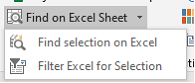
Change – Open Toolbox button and Find on Excel Sheet changed to Split button
|
|
Detailed Explanation
|
Open Toolbox on the Tools/Utilities group of the SSI Analysis Tools menu has a top button that opens the SSI Toolbox form plus split button features to run 8 of its utilities: Add common predecessor & successor, Add common prefix and suffix, Make text proper case, replace text, Trim text and Slack Evaporator
Find on Excel Sheet on the Tools/Utilities group of the SSI Analysis Tools menu has a top button finds an item on the active Excel sheet if one item is selected in a project or Filters for matching items on the active Excel sheet if more than one item is selected.
|
|
Build Release
|
13.4.1 - 08/23/2020
|
|
|
|
|
Change Number
|
13.4.SSI06 – Status Bar Information
|
|
Correction, Change or New feature
|
New feature – Task Information displayed on Microsoft Project status bar
|
|
Detailed Explanation
|
Task count, Sum of the remaining work and cost for the selected tasks is displayed on the Microsoft Project status bar. Sum of Remaining Work and Sum of Remaining Cost ignores summary task values, therefore, only the values for task work and cost is displayed.
|
|
Build Release
|
13.4.1 - 08/23/2020
|
|
Change Number
|
13.4.SSI07 – Browser Update
|
|
Correction, Change or New feature
|
Change – Added Browser support for 64 Bit MS Project
|
|
Detailed Explanation
|
Updated file and folder browser in the following SSI Tools:
1. Sync Remote Projects, EV Performance Reports, QBD Tools, Cobra Bridge, Convert Assignments, EV Express
|
|
Build Release
|
13.4.7 – 01-19-2021
|
|
|
|
|
Change Number
|
13.4.SSI08 – More Browser Update
|
|
Correction, Change or New feature
|
Change – Added Better Browser support for 64 Bit MS Project
|
|
Detailed Explanation
|
Updated file and folder browser in the following SSI Tools:
Sync Remote Projects, EV Performance Reports, QBD Tools, Cobra Bridge, Convert Assignments, EV Express
|
|
Build Release
|
13.4.8 – 04-24-2021
|
|
|
|
|
Change Number
|
13.4.SSI09 – Startup Log
|
|
Correction, Change or New feature
|
Change – Log SSI Analysis Tools startup
|
|
Detailed Explanation
|
Write a log file in SSI_Tools/Log showing startup procedure. This will help identify issues preventing SSI Tools from starting correctly
|
|
Build Release
|
13.4.8 – 04-24-2021
|