Many SSI Tools using dates would evaluate and write these dates according to US Month/Day/Year date format. This version tests the user’s system settings for its regional date setting and applies this format where applicable.
Build Release
13.5.0 09-21-2021
Change Number
13.5.SSIUpdates01 – SSI Tools Update Form
Correction, Change or New feature
Change Plus New Feature: New user form, User account and Administrator account on ssitools.com
Detailed Explanation
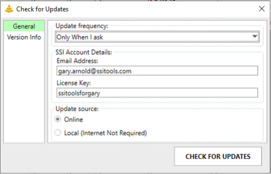
Check for Updates new user form:
· When updating to version 13.5 or higher from version 13.4.9 or lower, the user will see the previous update form and the current version will be installed as usual.
· Once the user has updated to version 13.5 or higher, the new update tools will be used for subsequent updates.
· The new update tools in version 13.5 will require the user’s email address and license key on the General tab of the “Check for Updates form”. If these values are not automatically displayed, the user will need to enter them for the first time.
· Version 13.5 updates and new installations capture the user’s email address and license key for subsequent updates. Once captured, these values will show on the new 13.5 update tools form.
· The update tool will validate the user’s license key and email as well as the organization’s Maintenance & Support coverage. If validated, the latest update will be downloaded and installed.
End User Account on ssitools.com
Additionally, an existing user will be given access to their own ssitools.com account, which will allow them to access exclusive online benefits such as training course schedules and unlisted (non-public) YouTube video instructional content. Structured Solutions will continue to enhance the features and benefits available to end user account holders.
Administrator Accounts on ssitools.com
Administrator accounts are also available to key individuals and focal points for clients with volume licensing agreements. Administrators have the same benefits as end users plus additional tools giving them information about activated & deactivated users in their organizational domain. Administrators are granted the ability to activate, deactivate and delete users in their domain.
When an administrator deactivates or deleting a user, that license becomes available for a new user. A deactivated or deleted user loses their ability to update SSI Tools and is excluded from utilizing end user benefits.